Partner Admin Link: getting credit for the Azure work you already do
If your customer buys Azure directly, Microsoft has no idea you are the one running it. Partner Admin Link closes that gap in about two minutes per tenant - what it does, when you want it, and the three ways to set it up.
You design the landing zone, you write the Bicep, you carry the pager. The customer bought their Azure commitment directly from Microsoft on an Enterprise Agreement, so you are not their reseller and never appear on an invoice. As far as Microsoft’s systems are concerned, that subscription grew on its own.
Partner Admin Link (PAL) is the fix, and it is one of the highest-return five minutes in the partner toolbox: you associate your partner organisation’s ID with the credentials you already use to deliver the service. Nothing changes for the customer. Everything changes for what Microsoft can see.
What it actually does
PAL attaches your Microsoft Cloud Partner Program ID to the identity you use in a customer’s tenant. From that point Microsoft can attribute influence and Azure Consumed Revenue (ACR) to your organisation, scoped to whatever that identity can reach.
It is worth being precise about what it is not:
- It is not a billing relationship. No invoice, no margin, no change to what the customer pays.
- It is not a permission change. It adds your partner ID to a credential that already exists; it grants nothing and takes nothing away.
- It is not CSP. If you resell through CSP, Partner Earned Credit is a separate mechanism with its own rules. PAL is what covers the case where the customer buys Azure directly.
- It is not for Microsoft 365 or Dynamics. Those have their own partner-of-record mechanism. PAL is Azure.
When you want it
Any engagement where you touch a customer’s Azure and are not the one selling it. In practice:
| Situation | PAL applies? |
|---|---|
| Customer on EA or MCA, you deliver a project or managed service | Yes — this is the core case |
| You manage customers through Azure Lighthouse | Yes, but linked differently (see below) |
| You are the CSP reseller for the subscription | Partner Earned Credit is the relevant mechanism |
| You only advise and never get tenant access | No — PAL needs an identity with RBAC |
Why it is worth the five minutes
Your work becomes visible inside Microsoft. ACR attribution is how Microsoft understands which partners are actually driving customer success in Azure. That shows up in partner programme measurement and in eligibility for incentives — the thresholds and the role requirements shift between programmes and over time, so confirm the current rules with your Partner Development Manager rather than assuming.
It gives you evidence instead of anecdote. Attributed consumption across your customer base is a number. “We do a lot of Azure work” is not. That difference matters in a designation review, in an incentive claim, and in the conversation where you ask Microsoft’s field team to bring you into a deal.
It is the input to your own reporting. In Partner Center you get Cloud Product Performance reporting through the My Insights dashboard — filter on Partner Admin Link as the association type and you can see influenced revenue per customer.
First: get access from the customer
PAL links an identity, so the identity has to exist and have Azure RBAC. Four routes, any of which works:
- Guest user — the customer invites you via B2B and assigns an Azure role.
- Directory account — the customer creates an account for you in their own tenant.
- Service principal — an app or script from your organisation, registered in their directory. This is the one to use for automation and pipelines.
- Azure Lighthouse — the customer delegates a subscription or resource group to your tenant.
No RBAC means no attribution. If a customer later shows up as missing from your reports, this is the first thing to check: either the linked account has no role assignment on anything, or the subscription it can reach has no usage.
Linking through the portal
Sign in to the customer’s tenant and open Link to a partner ID:
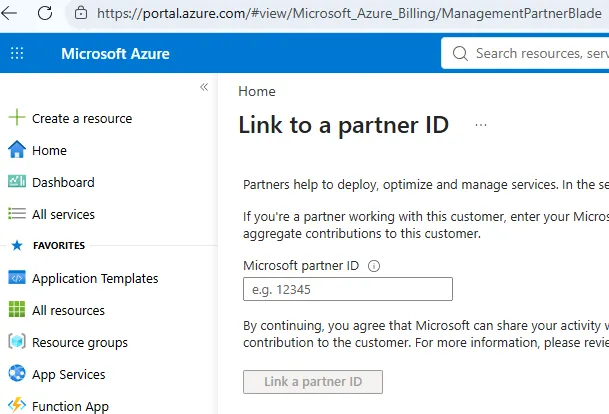
Enter your partner ID and save. That is the whole operation.
Use the Associated Partner ID, which you will find on your partner profile. This is the single most common mistake in the whole process: organisations with multiple IDs — a global account plus location accounts — link the wrong one and quietly attribute everything to something that does not count. Check the profile; do not guess from memory.
To do the next customer, switch directory in the portal and repeat. The link is per tenant, so ten customers means ten links.
Linking from the CLI
Faster once you have more than a couple of customers, and the only sane option for service principals:
az extension add --name managementpartner
az login --tenant <customer-tenant-id>

az managementpartner create --partner-id 12345
Verify, change or remove it:
az managementpartner show
az managementpartner update --partner-id 12345
az managementpartner delete --partner-id 12345
PowerShell does the same through the Az.ManagementPartner module:
Connect-AzAccount -TenantId <customer-tenant-id>
New-AzManagementPartner -PartnerId 12345

Get-AzManagementPartner
Update-AzManagementPartner -PartnerId 12345
Remove-AzManagementPartner -PartnerId 12345
Make az managementpartner show part of your onboarding checklist for a new customer. It is the
only way to find out that someone forgot, other than noticing a gap in reporting months later.
What gets attributed
The measurement scope is whatever administrative permission that account holds — management group, subscription, resource group, or a single resource. Scope the account to one resource group and that is what gets measured.
Two details that catch people out:
- Group assignments count. If a group has the RBAC assignment, PAL is recognised for every user in that group. You do not need to link each member’s role separately, but each member still needs their own PAL link.
- The link dies with the identity. If the Entra identity used for PAL is deleted or disabled, attribution stops on those resources. Offboarding an engineer therefore silently reduces your attributed revenue unless someone else’s linked account holds equivalent access. Worth a line in your leaver process.
The specific RBAC roles that qualify vary by programme. Reader is enough to establish a link but is not necessarily enough to earn against — again, a PDM question.
The Azure Lighthouse exception
This one is genuinely easy to get wrong, because it inverts the rule. With Lighthouse you do not link in each customer tenant. You link in your own service provider tenant, using an account that has access to the delegated customer resources.
Microsoft’s own recommendation, and it is the right one: create a service principal in your tenant, link your partner ID to it once, and then grant that principal access to every customer you onboard using a built-in role that is eligible for partner earned credit. One link, every customer, no per-tenant ritual to forget.
What to tell the customer
Some customers will ask, and the honest answer is reassuring:
PAL adds our partner ID to a credential your tenant already issued us. It does not change any permission, it does not give Microsoft any new data about your environment, and it does not affect your billing. It tells Microsoft that a partner is actively involved here.
Two further points if they push: only the partner can edit or remove their own link — the customer cannot change it, and neither can another partner. And the association is on the credential, not on their subscription.
The short version
- Get an identity in the customer tenant with real RBAC.
- Link your Associated Partner ID — portal, CLI, or PowerShell.
- Do it per tenant, except with Lighthouse, where you do it once in your own.
- Verify with
az managementpartner show, and put it in the onboarding checklist. - Check My Insights in Partner Center to confirm the revenue is landing.
Do it at the start of an engagement, not at the end. There is no reason to wait, and a linked account costs you nothing while it sits there.
Reference: Link a partner ID to your account on Microsoft Learn. Programme rules and incentive eligibility change — verify current requirements before building a business case on them.